
Adding Payment Information
Whether you're setting up your payment profile for the first time or updating an existing payout method, this guide will walk you through the process.
Why is Stripe asking for this information?
Lineup uses Stripe to securely process artist payouts. Because Stripe is responsible for transferring funds to your bank account, financial regulations require them to verify the identity of individuals and businesses receiving payments.
Your sensitive information, including identity verification documents and Social Security information, is submitted directly to Stripe using their secure verification system. Lineup does not collect, store, or have access to your full Social Security number or identity verification documents.
Before You Begin
Taking a minute to review these tips can help you complete your payment setup without delays or additional verification requests.
Use your legal name exactly as it appears on your government-issued ID.
If you're performing as a band but don't have a registered LLC or corporation, choose Individual and complete the payment profile using the legal information of the band member responsible for receiving payouts.
Double-check your date of birth, address, and email address for accuracy.
Make sure the bank account you add belongs to you or your registered business.
Have your routing number and bank account number available before getting started.
If Stripe requests additional verification, don't worry. This is a normal part of the identity verification process for some users and does not necessarily indicate a problem with your account.
First Time Setting Up Your Payment Profile
If you skipped adding payment information when creating your account, don't worry. Completing your payment profile typically takes less than 10 minutes, and we'll walk you through each step.
Step 1: Begin Account Setup
From the navigation menu, select Account.

At the top of the page, you'll see a notification that reads:
Account Setup Required
You need to set up your account to continue.
Click Get Started.
Step 2: Complete Your Business Details
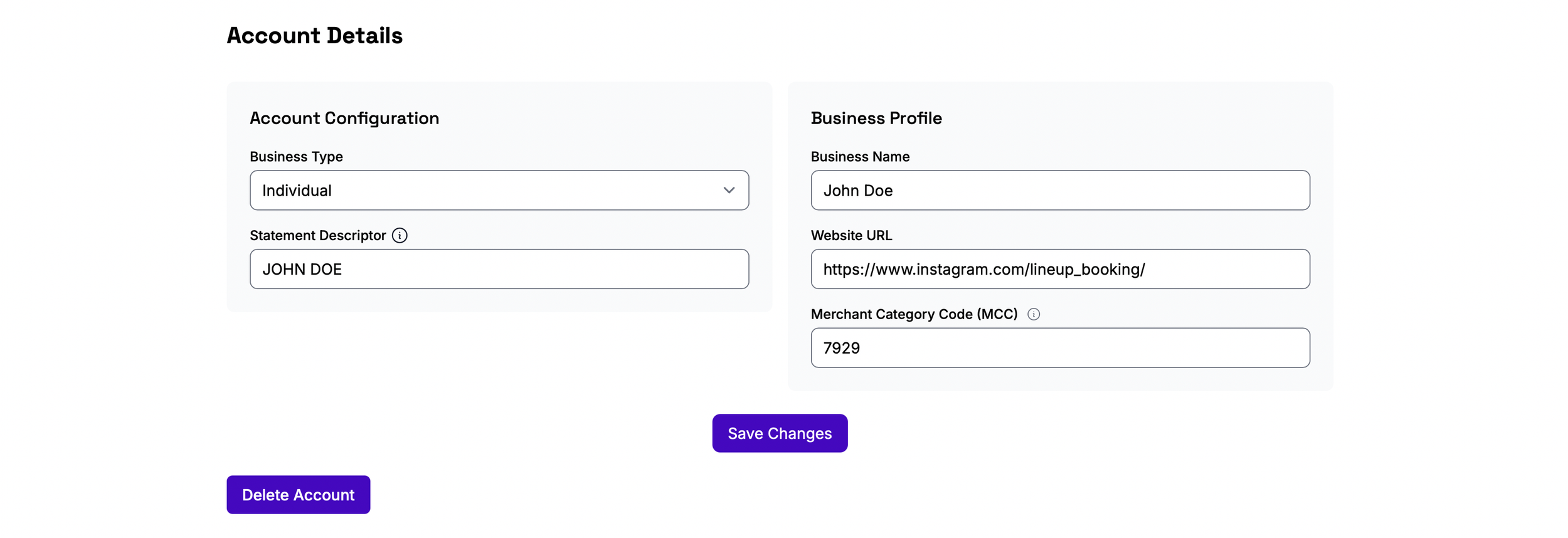
You'll be asked to provide some basic information about your payment account.
Business Type
If you're performing as yourself or as a band without a registered business entity, select Individual. If you've registered an LLC, corporation, or other business entity, choose the option that matches your business.
Performing as a band?
Even if your public profile represents a band, Stripe requires a real person or registered business to receive payouts. If your band is not registered as an LLC or corporation, one band member should complete the payment profile using their legal information. Your band name will still appear publicly on Lineup, while Stripe uses the representative's information only for payment processing, tax reporting, and identity verification.
Statement Descriptor
This is the text that may appear on bank statements when payments are processed. We recommend simply using your artist, band, or business name. For example: John Doe, John Doe Band, John Doe LLC.
Business Website
Stripe requires a public web presence. This can be your website or a public social media profile such as Instagram, Facebook, Linktree, or another public page that represents you or your band. For example: https://www.instagram.com/lineup_booking/
Merchant Category Code (MCC)
Enter:
7929
This code identifies your business as a musical performer or entertainment service.
Once you've completed these fields, click Save Changes.
Step 3: Add Your Bank Account
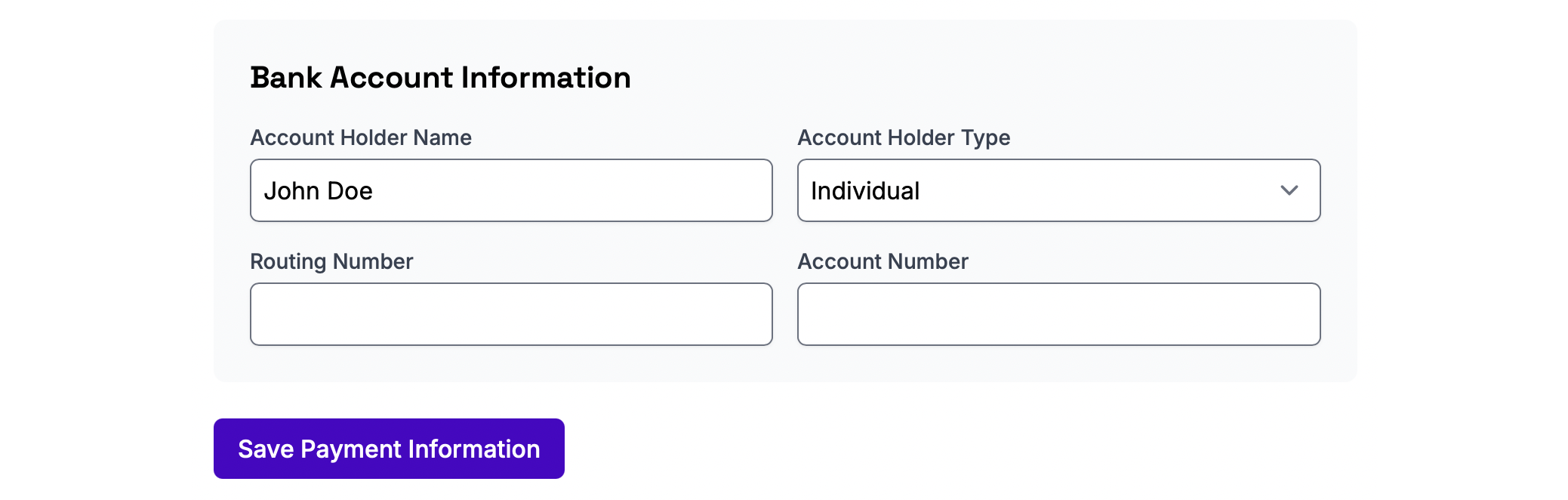
After saving, you'll return to your Account page.
Select External Account to add the bank account where you'd like to receive payouts.
You'll be asked for:
Account holder name
Account type (typically Individual)
Routing number
Bank account number
Once you've entered your banking information, click Save Payment Information.
Stripe will begin verifying your bank account.
Step 4: Complete Your Identity Verification

Return to the Account page and select Individual Information.
Stripe will request the following information:
First and last name
Email address
Phone number
Date of birth
Residential address
Merchant Category Code (7929)
Business website or social media page
Last four digits of your Social Security number
Government-issued photo ID (when requested)
After completing all required fields:
Check the box accepting the Stripe Terms of Service.
Click Update Profile.
Step 5: Verify Your Bank Account
After submitting your banking information, Stripe will need to verify that you own the account before payouts can be sent.
Depending on your bank, you'll be presented with one of two verification methods.
Instant Verification
Some banks support instant verification. If available, simply follow the prompts to securely connect your bank account. Once completed, your account is ready to receive payouts.
Micro-Deposit Verification
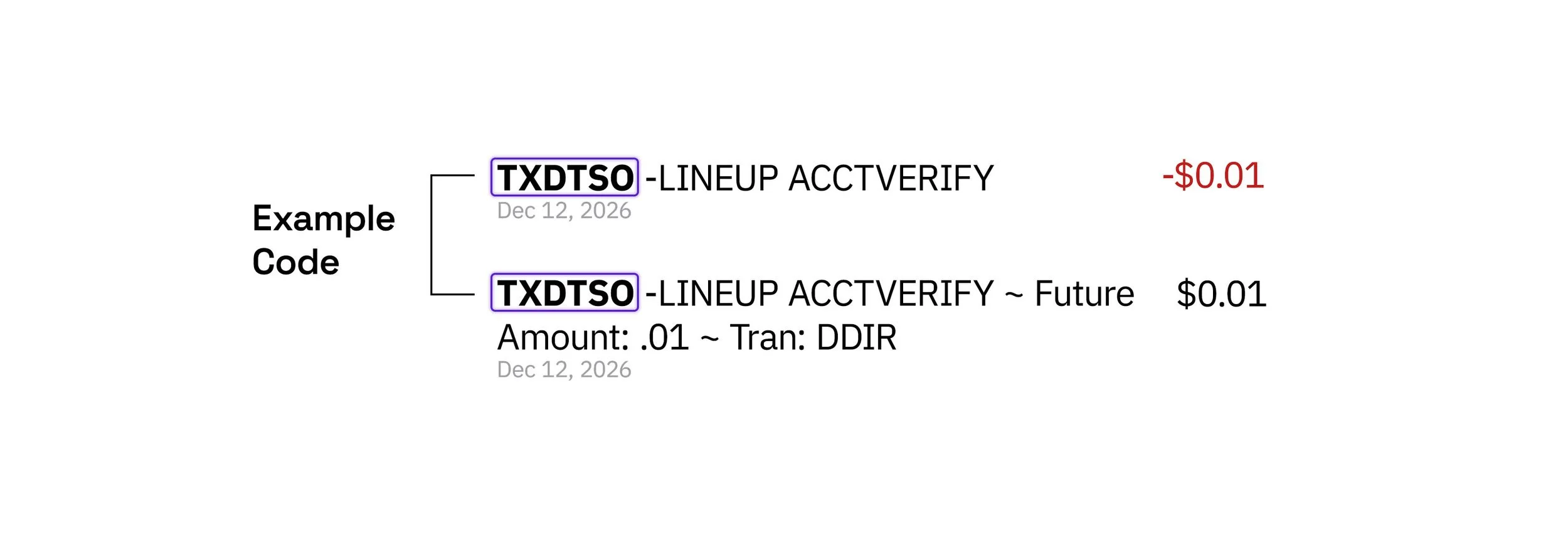
If instant verification isn't available, Stripe will send two small deposits (typically just a few cents each) to your bank account within 1 to 2 business days.

Once you receive the deposits:
Return to your Account page.
Select Verify Bank Account.
Enter either:
The exact amounts of the two micro-deposits, or
The verification code included with the deposits (if your bank provides one).
Click Verify to complete the process.
Once your bank account has been verified, you're all set to receive payouts through Lineup.
If Stripe Requests Additional Verification

Most artists can complete verification using the information above without any additional steps.
In some cases, Stripe may be unable to verify your identity automatically. This can happen if the information provided doesn't exactly match available records or if Stripe requires additional documentation to satisfy financial regulations.
If this happens, Stripe may request additional information, such as:
Your full Social Security number
A government-issued photo ID
Additional supporting documentation
This information is submitted directly to Stripe through their secure verification process. Lineup does not collect, store, or have access to your full Social Security number or identity verification documents.
If you're asked to provide additional information, simply follow the prompts provided by Stripe. Once your identity has been verified, your payment profile will be fully activated and you'll be ready to receive payouts through Lineup.
Already Have a Payment Profile?
If you've previously completed your Stripe payment profile during onboarding with Lineup and simply need to verify your bank account, follow the steps below.

After adding your banking information, Stripe will need to verify that you own the account before payouts can be sent.
Depending on your bank, you'll be presented with one of two verification methods.
Instant Verification
Some banks support instant verification. If available, simply follow the prompts to securely connect your bank account. Once completed, your account is ready to receive payouts.
Micro-Deposit Verification
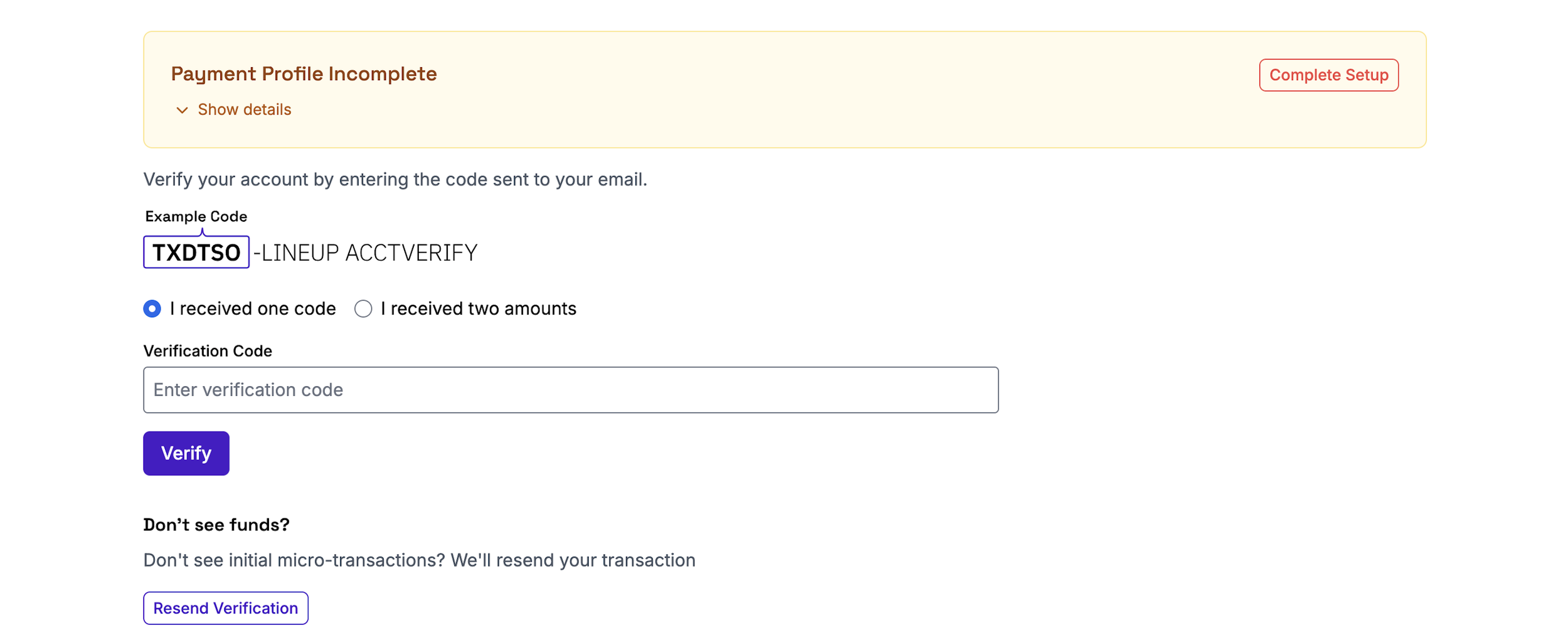
If instant verification isn't available, Stripe will send two small deposits (typically just a few cents each) to your bank account within 1 to 2 business days.
Once you receive the deposits:
Navigate to Account.
Select Verify Bank Account.
Enter either:
The exact amounts of the two micro-deposits, or
The verification code included with the deposits (if your bank provides one).
Click Verify to complete the process.
Once your bank account has been verified, you're all set to receive payouts through Lineup.
Now that your account is set up, continue to the next tutorial >
